
Do you wish you could run Windows and Linux on the same computer at the same time? Or test risky software without breaking your system? These problems used to mean buying multiple computers and spending lots of money.
As a company, you face even bigger headaches. Rooms full of expensive servers, each running just one task. Most are sitting around doing nothing, wasting electricity and money. IT teams are spending nights fixing broken servers instead of sleeping.
Here’s what we’ll cover
- What hypervisors are
- How hypervisors make one computer act like many
- The two main types you’ll encounter
- Why this technology saves money and time
- Real examples of hypervisors in action
Let’s explore this clever software that changed computing forever.
What Are Hypervisors
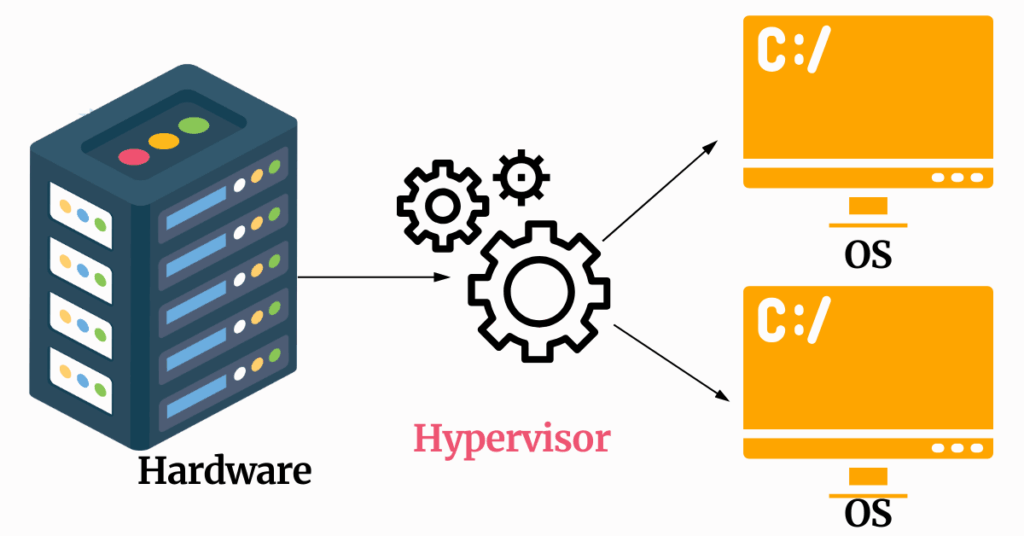
A hypervisor is software that lets you run multiple operating systems on one physical computer at the same time. Think of it like a super-smart manager that divides your computer’s power between several “pretend” computers.
Imagine your computer is a big pizza. Normally, one operating system eats the whole pizza. A hypervisor cuts that pizza into slices and gives each slice to a different operating system. Each operating system thinks it has its own complete pizza, but they’re all sharing the same one.
The technical name for hypervisors is “virtual machine monitor” or VMM. But most people just say hypervisor because it’s easier to remember.
Here’s what makes hypervisors special.
They sit between your computer’s hardware (the physical parts) and the operating systems running on top. The hypervisor controls everything.
- How much memory each system gets.
- Which processor cores they can use.
- How they access storage and networks.
Each separate operating system running through a hypervisor is called a virtual machine or VM. These VMs are completely isolated from each other. If one VM crashes or gets infected with a virus, the others keep working fine. Your main computer stays safe, too.
The global hypervisor market reached $7.0 billion in 2026, and experts predict it will grow to $10.7 billion by 2035. This massive growth shows how important hypervisors have become for modern computing.
How Hypervisors Work Behind the Scenes
Let’s break down what happens when you use a hypervisor, step by step.
The Basic Process
Installation
First, you install hypervisor software on your computer. Popular options include VMware, VirtualBox, and Hyper-V. The hypervisor takes control of your computer’s hardware resources, that is, the processor, memory, storage, and network connections.
Create a virtual machine.
Next, you tell the hypervisor to create a virtual machine. You specify how much power this VM needs: “Give it 2 processor cores, 4 gigabytes of memory, and 50 gigabytes of storage.” The hypervisor reserves these resources from your physical computer.
Install the operating system
Then you install an operating system on this VM, just like you would on a regular computer. The VM boots up and runs usually. From inside the VM, everything looks and feels like a real computer. You can’t tell you’re running on virtual hardware.
Resource Management
Here’s where hypervisors get really clever.
When a VM needs to do something, let’s open a program, save a file, or send data over the network. It asks the hypervisor for help. The hypervisor translates this request into commands that the physical hardware can follow.
Multiple VMs might need processor time at the same moment. The hypervisor acts like a traffic cop, quickly switching between VMs so fast that each one feels like it has the processor to itself. This happens thousands of times per second.
Memory gets divided up similarly. Each VM gets its own chunk of RAM. The hypervisor makes sure VMs can’t peek into each other’s memory or steal memory from other VMs.
Storage works through virtual hard drives. The hypervisor creates files on your physical hard drive that act like complete hard drives for each VM. These files can be huge, 50 or 100 gigabytes, but they’re just files you can copy, move, or delete.
Keeping Everything Separate
Isolation is one of the hypervisor’s most important jobs. Each VM operates in its own sealed bubble. A VM can’t access another VM’s files, memory, or network traffic. This separation provides security and stability.
If you’re testing sketchy software in a VM and it turns out to be malware, no problem. The virus is trapped inside that VM. Your other VMs keep working. Your main computer stays clean. Just delete the infected VM and create a new one.
This isolation also means you can run completely different operating systems side by side. Linux next to Windows next to macOS. Old software next to new software. Testing environments next to production systems. All on one computer.
Type 1 Hypervisors
Now let’s talk about the two main types of hypervisors. They work differently and serve different purposes.
What Makes Type 1 Special
Type 1 hypervisors install directly on your computer’s hardware. There’s no regular operating system underneath. The hypervisor IS the operating system, in a way. That’s why people call them “bare-metal” hypervisors. They run right on the bare metal of your computer.
This direct connection to hardware gives Type 1 hypervisors significant advantages. They’re faster because there’s no extra operating system slowing things down. They’re more secure because there are fewer layers where bugs can hide.
They’re more stable because there’s less software that could crash.
Popular Type 1 Examples
VMware ESXi leads the enterprise market. Companies use it to run thousands of virtual machines across their data centers. It’s robust, reliable, and comes with excellent management tools. The downside? It’s complex and expensive.
Microsoft Hyper-V comes built into Windows Server. If you’re already running Windows in your company, Hyper-V makes sense. It integrates smoothly with other Microsoft products, and many IT teams already know how to use it.
KVM (Kernel-based Virtual Machine) is open-source and free. It’s built into the Linux kernel, making it super efficient on Linux servers. Tech companies love KVM because it’s free, flexible, and powerful. The virtualization software market is expected to balloon from $57.3 billion in 2022 to $364.8 billion by 2033, with KVM capturing a growing market share.
Citrix Hypervisor (formerly XenServer) offers enterprise features with good performance. It’s not as popular as VMware or Hyper-V, but some companies prefer it.
When to Use Type 1
Type 1 hypervisors work best in these situations:
- Running production servers in companies
- Building cloud infrastructure like AWS or Azure
- Hosting lots of VMs on powerful hardware
- Mission-critical applications that need top performance
- Data centers consolidating many physical servers
The setup is more complex, though. You need dedicated hardware. You need technical knowledge. You can’t just install Type 1 on your laptop like you would regular software.
Type 2 Hypervisors
Type 2 hypervisors work differently. They install as regular programs on top of your existing operating system.
How Type 2 Works
Imagine you’re running Windows 11 on your laptop. You want to test some software on Linux without deleting Windows. You download VirtualBox (a Type 2 hypervisor) and install it like any other program. Then you create a Linux VM inside VirtualBox.
Now you have Windows running as your main OS, and Linux running inside a window on your screen. You can switch between them instantly. It’s convenient and easy.
The tradeoff? Performance.
Your Windows OS uses computer resources. VirtualBox uses more resources. The Linux VM uses even more resources. All these layers mean Type 2 hypervisors run slower than Type 1.
Popular Type 2 Examples
Oracle VirtualBox is completely free and works on Windows, Mac, and Linux. Millions of developers use it daily for testing and development. The interface is friendly enough for beginners but powerful enough for advanced users.
VMware Workstation (Windows/Linux) and VMware Fusion (Mac) are professional tools. They cost money but offer better performance and more features than VirtualBox. Many developers happily pay for the extra polish.
Parallels Desktop focuses on running Windows on Mac computers. Mac users who need Windows programs love Parallels because it makes Windows feel like a native Mac app.
When to Use Type 2
Type 2 hypervisors shine in these scenarios:
- Software developers testing code on multiple operating systems
- Students learning about different operating systems
- People wanting to try Linux without leaving Windows
- Security researchers analyzing malware safely
- Anyone needing VMs occasionally on their personal computer
Type 2 is perfect for learning. You can install VirtualBox right now, create a Linux VM, and start experimenting within an hour. No risk to your main computer.
Real-World Uses of Hypervisors

Let’s look at how hypervisors solve real problems for real people and businesses.
Server Consolidation in Companies
This is the biggest use case by far. Companies used to have one physical server for each task:
- One server for email
- One server for their website
- One server for their database
- One server for file storage
- One server for their accounting software
That’s five expensive servers, five electricity bills, five sets of backup hardware, and five systems for IT teams to maintain. Plus, each server typically used only 10-20% of its capacity.
Huge waste.
With hypervisors, companies put everything on one or two powerful physical servers running multiple VMs. One VM handles email, another runs the website, another manages the database, and so on. Companies report 66% increased agility after adopting virtualization, along with 50% better operational efficiency.
The savings are enormous. Less hardware to buy. Lower electricity costs. Smaller data centers. Fewer IT staff needed for basic maintenance.
Cloud Computing Infrastructure
Every time you use cloud services like CloudPap, AWS, Google Cloud, or Microsoft Azure, you’re using hypervisors. The entire cloud computing industry is built on hypervisor technology.
Cloud providers have massive data centers filled with powerful physical servers. These servers run Type 1 hypervisors. When you rent a “cloud server,” you’re getting a VM running on their hardware.
This setup lets cloud providers pack hundreds of customers onto the same physical machines. Each customer’s VM is isolated and secure. You can’t see other customers’ data, and they can’t see yours. The hypervisor keeps everything separate.
North America holds about 30-39% of the global hypervisor market, mainly because major cloud providers like Amazon, Microsoft, and Google operate massive data centers in the United States.
Development and Testing
As a software developer, ofcourse, you depend on hypervisors daily. When building an app, you need to test it on different operating systems and configurations. Buying separate computers for each test environment would cost thousands of dollars.
Instead, you create VMs. Need to test on Windows 10, Windows 11, three versions of Linux, and two versions of macOS? Create six VMs. Run tests on all of them. Find bugs faster. The whole setup takes hours instead of weeks.
Developers also use snapshots, saving the exact state of a VM at a specific moment. Before testing risky changes, take a snapshot. If something breaks, restore the snapshot and try again. No need to reinstall everything from scratch.
Education and Training
Schools and training centers use hypervisors to teach students. Instead of maintaining computer labs with different operating systems, schools provide students with VMs.
Each student gets the same standardized VM environment. Everyone has identical software versions. No “it works on my computer but not yours” problems. Teachers can reset VMs between classes, giving each new class a fresh start.
Students can experiment freely. Want to see what happens if you delete system files? Go ahead – you’re in a VM. Break it spectacularly, learn from the experience, then delete that VM and create a new one.
Security Research and Malware Analysis
Security experts analyze dangerous software using hypervisors. They create an isolated VM, infect it with malware, and watch what the malware does. The hypervisor keeps the malware trapped inside the VM, where it can’t cause real damage.
This work would be nearly impossible without hypervisors. Examining malware on a real computer risks infecting the entire network. With hypervisors, researchers can safely study even the most destructive viruses.
Automotive Industry Growth
Here’s a surprising use: modern cars. The automotive hypervisor market grew from $348.2 million in 2025 to a projected $1.87 billion by 2032. Car manufacturers use hypervisors to manage the dozens of computer systems in modern vehicles.
Your car’s entertainment system, navigation, safety features, and engine management all run on separate VMs. This isolation prevents a crash in the entertainment system from affecting critical safety features. Your music player can freeze without impacting your anti-lock brakes.
The Downsides and Challenges
Hypervisors aren’t perfect. Let’s be honest about the problems.
Performance Overhead
Running a hypervisor uses computer resources. Type 2 hypervisors, especially, can slow things down noticeably. You’re running your main operating system, the hypervisor software, and then the VMs on top. All those layers consume memory and processor power.
For most office work and development, this overhead doesn’t cause issues. But for graphics-intensive tasks like video editing or gaming, the performance hit can be annoying.
Type 1 hypervisors perform much better than Type 2, but even they can’t match running directly on hardware.
Complexity for Beginners
Setting up hypervisors, especially Type 1, requires technical knowledge. You need to understand concepts like CPU allocation, memory management, virtual networking, and storage provisioning.
The learning curve intimidates many beginners.
Type 2 hypervisors are easier but still require effort. Creating your first VM involves making decisions about resource allocation that might confuse newcomers.
How much memory should you allocate? How many CPU cores? What type of virtual network?
Licensing Costs Can Surprise You
While some hypervisors are free (VirtualBox, KVM), enterprise options cost serious money. VMware’s recent licensing changes have shocked many businesses with huge price increases. Companies that relied on VMware are now desperately looking for alternatives.
You also need to license the operating systems running in your VMs. Want ten Windows VMs? You might need ten Windows licenses. Software licensing for virtualized environments can get expensive and confusing fast.
Security Vulnerabilities
Hypervisors add a new layer that could have security holes. If someone finds a vulnerability in the hypervisor itself, they might escape from a VM and attack the host system or other VMs. These “VM escape” attacks are rare but extremely serious when they happen.
Keeping hypervisors updated with security patches becomes critical. Companies need dedicated staff monitoring for vulnerabilities and applying updates regularly.
Resource Contention
When multiple VMs compete for the same resources, performance suffers. If five VMs all need maximum CPU power simultaneously, they’ll slow each other down. The hypervisor tries to share fairly, but there’s only so much hardware to go around.
Planning resource allocation carefully matters for good performance. Overloading a physical server with too many VMs creates a sluggish experience for everyone.
Do You Need Hypervisors?
Let’s help you decide if hypervisors make sense for your situation.
You Should Explore Hypervisors If:
- You want to try different operating systems without multiple computers
- You’re learning system administration or cybersecurity
- You develop software that needs testing on multiple platforms
- Your business wants to reduce server costs
- You need isolated environments for risky experiments
- You’re building cloud infrastructure
- Your company needs disaster recovery solutions
- You want to run old software that requires outdated operating systems
You Can Skip Hypervisors If:
- Your computer has limited resources (less than 8GB RAM)
- You’re happy with your current single operating system
- You primarily game or do graphics work, needing maximum performance
- The learning curve feels too steep for your needs
- You don’t have time to learn new technology
For Students and Learners
Hypervisors are incredible learning tools. You can break things without consequences. Experiment freely. Try operating systems you’ve never used. Build skills that employers value.
Start with VirtualBox. It’s free, well-documented, and has tons of tutorials online. Create a Linux VM and explore. The experience alone teaches you valuable lessons about how computers work.
For Developers
Hypervisors should be standard tools in your workflow. Testing across platforms becomes trivial. Creating consistent development environments solves countless headaches. Most programming jobs expect you to know virtualization basics.
For Businesses
Run the numbers carefully. If you’re maintaining multiple physical servers, hypervisors will likely save substantial money. The initial investment in hypervisor software and training pays off through reduced hardware costs, lower electricity bills, and improved efficiency.
However, consider the VMware licensing situation carefully in 2026. Many companies are migrating to alternatives like KVM, Hyper-V, or Proxmox to escape expensive subscription models.
For IT Professionals
Learning hypervisors isn’t optional anymore – it’s essential. Cloud computing, which dominates modern IT, is built entirely on virtualization. Understanding hypervisors, VMs, and resource management makes you more valuable to employers.
Get hands-on experience with multiple platforms. VMware still dominates corporate environments, but alternatives are growing fast. Broad knowledge serves you better than expertise in a single platform.
The Future of Hypervisor Technology
Where are hypervisors headed? Several exciting trends are emerging.
AI-Powered Management
Artificial intelligence is coming to hypervisor management. AI systems will automatically optimize resource allocation, predict when VMs need more power, and detect performance problems before they impact users.
Instead of IT staff manually monitoring and adjusting VMs, AI handles routine optimization. This reduces management costs while improving performance.
Edge Computing Expansion
Hypervisors are moving beyond data centers. Edge computing means running applications closer to users – in cell towers, local offices, or even vehicles. Hypervisors work perfectly for edge deployments because they’re portable and easy to manage remotely.
The hyper-converged infrastructure market, which combines hypervisors with storage and networking, is expected to reach $61.49 billion by 2032. Much of this growth comes from edge computing deployments.
Open-Source Momentum
Proprietary hypervisors like VMware are losing ground to open-source alternatives. KVM, Proxmox, and other free options are maturing rapidly. More companies are comfortable trusting open-source hypervisors for production workloads.
This shift accelerated after Broadcom acquired VMware and changed licensing terms. Companies that felt trapped by vendor lock-in are enthusiastically exploring alternatives.
Container Integration
Containers (like Docker) and hypervisors are working together rather than competing. Many companies run Kubernetes (a container platform) inside VMs to get benefits from both technologies. Containers handle microservices, while hypervisors provide strong isolation and security.
Better Security Features
Hypervisors are adding advanced security capabilities. Encrypted VMs protect data even from system administrators. Micro-segmentation isolates VM network traffic. AI-powered threat detection spots suspicious behavior automatically.
As cyber threats evolve, hypervisors become more important for containing breaches and protecting sensitive data.
Sustainability Focus
Data centers consume enormous amounts of electricity. Hypervisors help by improving hardware utilization. Instead of dozens of mostly idle servers, fewer servers running many VMs accomplish the same work while using less power.
This efficiency reduces carbon emissions and electricity costs. As companies focus more on sustainability, hypervisor adoption will increase.
Wrapping Up
Hypervisors are the invisible workers that power modern computing. They turn one physical computer into many virtual computers, each running independently and securely.
Two main types serve different needs. Type 1 hypervisors run directly on hardware, offering top performance for businesses and cloud providers. Type 2 hypervisors run on regular operating systems, providing easy access for developers and learners.
The benefits are clear.
- Lower costs through server consolidation
- Improved flexibility
- Better security through isolation
- Easier disaster recovery
- Efficient resource use.
The challenges exist, too.
- Performance overhead
- Management complexity
- Licensing costs
- Security concerns that need attention.
Whether you’re a student exploring technology, a developer building apps, or a business leader cutting costs, hypervisors offer powerful capabilities worth exploring.
Ready to try one? Download VirtualBox, create your first VM, and see what hypervisors can do. The learning experience is valuable, and you might discover uses you never imagined.
Hypervisors are just clever software that makes computers more useful, more flexible, and more efficient. In a world that runs on computing power, hypervisors are incredibly important.