Ever stared at a cloud hosting dashboard, completely confused about whether you need 2 CPUs or 20?
Here’s the thing.
As a founder launching your first SaaS app, you’ll face this headache. You don’t want to overpay for resources you’ll never use. But you also don’t want your app to crash the moment you land your first 100 users.
It’s like trying to guess how much food to buy for a party when you have no idea how many people are showing up.
The confusion gets worse when you’re hit with terms like “vCPUs,” “memory allocation,” “auto-scaling,” and “serverless architecture.”
Meanwhile, you want to know: how much will this actually cost me, and will it handle my users?
Here’s what we’ll cover:
- The exact compute specs you need based on your user count
- How to choose between serverless and traditional hosting
- Real costs you can expect at different growth stages
- Innovative ways to optimize and avoid wasting money
- Planning for AI features and future scaling
Let’s break this down in a way that actually makes sense.
Compute Requirements for Small SaaS Applications
First, the straight answer.
Most small SaaS apps need between 1-4 vCPUs and 8-64 GiB of memory to run smoothly.
Think of it like this. If your app were a restaurant, CPUs are the chefs cooking orders, and memory is the counter space they need to work.
Now, before you rush to pick the smallest option to save money, hold on. Your actual needs depend on four big factors.
A. Number of concurrent users
These are the people using your app right now, not your total signup count. This is huge. You might have 10,000 registered users, but if only 200 are active at once, you need way less compute power.
B. Application complexity
A simple to-do list app? Lightweight. A real-time video editor? That’s going to need some serious muscle.
C.Traffic patterns
Does your app get steady use all day, or does everyone pile on between 9-5? Spike-prone traffic needs different planning than smooth, predictable loads.
D. Your architecture choice
Serverless functions, containers, or traditional virtual machines change everything about how you calculate needs and costs.
As a baseline, expect $30 to $320 per month for compute resources, depending on your scale. That’s actually pretty affordable when you think about it.
What is Compute Power in SaaS?
Let’s make this super simple.
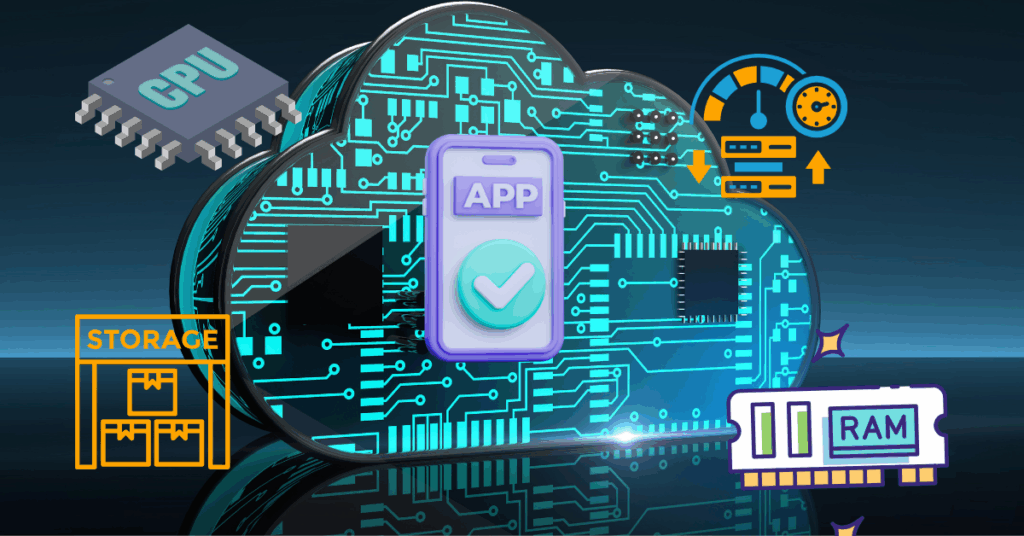
When we talk about “compute power,” we’re really talking about four main things your app needs to run:
a) CPU (processing power)
CPU handles all the thinking. Every time someone clicks a button, submits a form, or loads a page, the CPU processes that request. More complex calculations need more CPU juice.
b) Memory (RAM)
Here is where your app keeps information it’s actively using. When users log in and start sessions, that data lives in memory. It’s like your brain’s short-term memory, fast access to stuff you need right now.
c) Storage
This is where your database lives, where files are saved, and where everything is permanently stored. Unlike memory, this doesn’t disappear when you restart.
d) Bandwidth
It is the highway that moves data in and out. When users download reports or upload images, that’s bandwidth at work.
Here’s a common mistake you can make.
Thinking in terms of more users automatically means more compute. Actually, it’s more nuanced than that. What really matters is how many users are active at the same time and what they’re doing.
Another misconception? Confusing total registered users with concurrent active users.
You might have 5,000 people signed up, but only 250 are using your app simultaneously during peak hours.
Big difference.
Compute Requirements by User Scale
Let’s get specific with real numbers you can use.
Starting Small (100-1,000 users)
When you’re just launching, you don’t need much. We’re talking 1-2 vCPUs minimum and 2-8 GiB of RAM. This works perfectly for simple tools like landing page builders, basic CRM systems, or straightforward CRUD apps (Create, Read, Update, Delete. The bread and butter of most apps).
Cost?
Usually $10-$50 per month. That’s less than a couple of lunches out.
Think of this tier like a food truck. You’ve got everything you need to serve customers, but you’re not running a full restaurant yet.
Growing Medium (1,000-10,000 users)
Now things are getting interesting. You’re gaining traction, users are engaging more, and you need to level up. At this stage, you’re looking at 2-4 vCPUs and 8-32 GiB of RAM for standard web servers and application servers.
Here’s where auto-scaling becomes your best friend.
Instead of manually upgrading every time traffic increases, auto-scaling automatically adds resources when needed and scales back down when traffic slows.
Budget-wise, expect $100-$500 per month. Still manageable, and you’re definitely getting real business value now.
This is like upgrading from a food truck to a small restaurant with a few tables. You need more space and staff, but you’re not opening a massive dining hall yet.
Scaling Large (10,000-100,000 users)
Welcome to the big leagues.
At this point, you’re running 4-8+ vCPUs with horizontal scaling (adding more servers rather than making a single server bigger). You’ll distribute 32-64+ GiB of RAM across multiple instances.
You’ll also start thinking about multi-region considerations, serving users from data centers closer to them for better performance.
Costs jump to $500 to $5,000+ per month, but here’s the thing: you’re generating serious revenue at this scale, so it’s proportional to your growth.
Choosing the Right Architecture for Your Compute Needs
This is where things get really interesting. In 2026, you’ve got more options than ever for how to structure your infrastructure.
1. Serverless Computing (Function-as-a-Service)
Serverless is a game-changer for many small SaaS apps.
Here’s why.
Serverless architectures bill only for the actual computation time used, meaning every dollar goes toward actual consumption rather than idle server time.
Cold starts (the delay when a function hasn’t run recently) used to be a problem, but now they’re under 50ms in most 2025 solutions. That’s basically instant.
Here’s a real example.
You can handle about 1 million requests for roughly $7 per month. Try beating that with traditional hosting.
Serverless works best for variable traffic patterns, event-driven apps (like sending emails or processing images), and MVPs where you’re testing the waters.
2. Traditional Hosting (VMs/Containers)
Sometimes you need the classic approach.
Virtual machines and containers in the cloud, give you more control and work better for predictable traffic, long-running processes, or stateful apps that need to remember things between requests.
The trade-off?
You’re responsible for more management, and costs start at $30+ monthly for basic instances. You’re paying for that server 24/7, whether you’re using it or not.
3. Hybrid Approach (2026 Best Practice)
Here’s what’s actually happening.
Gartner predicts that 90% of organizations will adopt a hybrid cloud approach through 2027, combining serverless and containerized workloads. This isn’t just a trend. It’s becoming the standard way to build.
Why? Because you get the best of both worlds.
Keep your core APIs in containers for consistency and reliability. Run background tasks (email processing, image compression, data syncing) on serverless for cost efficiency. Use edge computing for global performance.
It’s like having a main kitchen for your core menu items, but calling in specialized caterers for special events. Smart resource allocation.
How to Calculate Your Actual Compute Needs
Let’s talk about metrics—the numbers you actually need to watch.
CPU utilization should target around 40% as a reasonable baseline for optimization. If you’re consistently at 80-90%, you need more power.
If you’re at 10-20%, you’re probably overpaying.
Monitor memory active usage versus allocated. Just because you’ve allocated 16 GiB doesn’t mean you’re using all of it. Track what’s actually being used.
Watch request latency and response times. If pages are taking longer than 500ms to load, that’s a red flag.
Pay attention to concurrent connection limits. This is often overlooked but can cause mysterious crashes.
Here’s a simple calculation formula.
Peak concurrent users × resource per user = minimum capacity. Then add 20-30% overhead for stability and unexpected spikes.
For example, if you expect 500 concurrent users, and each user needs about 10 MB of memory, that’s 5 GB. Add 30% overhead (1.5 GB), and you need at least 6.5 GB of RAM.
Reducing Compute Costs Without Sacrificing Performance
Money matters, especially when you’re bootstrapping or on a tight runway.
Let’s talk optimization strategies that actually work.
a) Right-Sizing Resources
The first step is understanding actual usage by monitoring CPU, memory, and network utilization. You’d be surprised how many people run oversized servers “just in case.”
Avoid over-provisioning.
Match instance types to workload profiles. Don’t use a compute-optimized instance for a memory-heavy workload. Use monitoring tools continuously, not just once at setup.
b) Auto-Scaling Implementation
Scale horizontally when possible (adding more small servers) rather than vertically (making a single server bigger). It’s more resilient and often cheaper.
For Kubernetes users, HorizontalPodAutoscaler can target 70% CPU utilization, automatically adjusting your pod count to maintain efficiency.
Pro tip: Schedule shutdowns for development and test environments. No reason to run those outside business hours.
c) Commitment-Based Discounts
Here’s where you can save serious money.
Reserved instances or savings plans give discounts of up to 60% when you commit for a longer period. If you know you’ll need certain resources for the next year, lock them in.
Use spot instances for flexible, non-critical tasks. These are spare cloud capacity sold at huge discounts, perfect for batch processing or background jobs.
Also, if you’re a startup, check out the AWS Activate Program. It’s specifically designed for startups and provides AWS credits plus technical support.
d) Cloud Cost Management
Good optimization can deliver measurable cost relief of 10-25% within 90 days. That’s real money back in your pocket.
Implement tagging strategies, so you know what each resource costs and which project it belongs to.
Use FinOps tools for visibility into spending patterns. Run regular audits to identify waste; the forgotten test server still running will surprise you.
Planning for AI-Powered SaaS Features
AI is everywhere in 2026, significantly changing the compute equation.
Here’s the challenge.
Unlike traditional SaaS apps, AI has high processing requirements that are incremental and lack economies of scale. Every AI request costs you compute time. Token or credit-based pricing is now tied directly to the compute required.
The hyperscalers (AWS, Google Cloud, Azure) continue elevated AI-related investment through 2025 and beyond, which means better tools but also higher baseline costs for AI features.
If you’re adding AI to your SaaS, you’ll likely need GPU resources for machine learning workloads. These are significantly more expensive than regular compute. We’re talking hundreds or thousands per month, depending on usage.
Managing AI costs requires a different approach.
Treat AI features as optional add-ons with usage guardrails. Don’t give unlimited AI generations to free users, for example.
Usage-based pricing models are becoming standard for AI features. Pass some of those compute costs to users who get value from AI capabilities.
Plan for dynamic COGS (Cost of Goods Sold) tied to AI workloads. Unlike traditional software, where adding users barely increases costs, AI makes each user genuinely more expensive to serve.
Security Requirements That Impact Compute Needs
Security isn’t free. It takes compute resources. Let’s talk about what that means.
- Multi-tenant isolation (keeping different customers’ data separated) requires additional processing.
- Encryption and decryption add overhead every time data moves.
- Compliance monitoring for standards such as SOC2, HIPAA, or GDPR requires resources.
- DDoS protection and WAF (Web Application Firewall) filtering also consume compute.
Realistically, add 10-20% compute overhead for proper security implementation. It’s worth it.
One breach costs way more than the extra resources it takes to prevent it.
Micro-VMs provide stronger tenant isolation but use more resources than simple application-level separation. Security monitoring tools themselves need CPU and memory to run.
Factoring in Database Resources
Your database deserves its own conversation because it’s separate from application compute in most architectures.
Database compute is usually split out. You’re not running your database on the same server as your web app (unless you’re really at an early stage). Connection pooling helps reduce resource usage by reusing database connections rather than constantly creating new ones.
Managed databases cost 20-40% more than self-managed options, but they massively reduce operational overhead. Someone else handles backups, updates, scaling, and monitoring. For most small teams, that’s absolutely worth it.
When scaling databases, consider read replicas for heavy read workloads. Most apps read data way more than they write it, so splitting reads across multiple replicas helps tremendously.
Caching layers like Redis or Memcached reduce database load by storing frequently accessed data in memory. Distributed SQL enables horizontal scaling as you outgrow a single database server.
Real-World SaaS Compute Examples
Let’s ground all this theory in actual examples.
A simple CRUD app with 5,000 users might run fine on 2 vCPUs and 4 GiB of RAM. Think project management tools, simple inventory systems, or basic customer portals.
A real-time analytics dashboard needs more muscle. 4 vCPUs and 16 GiB of RAM make sense. You’re processing data constantly and serving multiple simultaneous visualizations.
A multi-tenant B2B platform serving multiple companies’ needs distributed architecture with 8+ vCPUs spread across instances. Security isolation and consistent performance for all tenants matter here.
One real example.
A quiz platform handling 1,000-1,200 concurrent users ran smoothly on 16 vCPUs and 24GB of memory. That’s a pretty intensive workload, real-time responses, score calculations, and leaderboards constantly updating.
Emerging Technologies Shaping SaaS Infrastructure
Technology doesn’t stand still, and 2026 brings some exciting developments.
- WebAssembly (Wasm) enables languages like Rust, Go, and Python to run in sandboxed runtimes on edge gateways. This means running code closer to users without traditional server deployment.
- Edge computing reduces central compute load by processing requests at the network edge, closer to users: faster responses, lower latency, and a better user experience.
- Platform engineering and golden-path templates are making infrastructure setup easier. Instead of every developer figuring out deployment from scratch, teams create approved patterns that work well.
- Multi-cloud strategies provide resilience. If one provider has issues, you can shift to another. It’s more complex but offers peace of mind.
Most modern apps use serverless or containerized deployments with horizontal and vertical scaling, enabling them to automatically adapt to demand.
How to Determine Your SaaS Compute Needs
Let’s wrap this up with a practical checklist you can actually use.
Step 1: Estimate concurrent users, not total registrations. Typically, only 5-20% of total users are active concurrently, so a 10,000-user app might only see 500-2,000 concurrent users at peak.
Step 2: Profile your application’s resource usage patterns. Run tests, check metrics, and understand whether you’re CPU-bound or memory-bound.
Step 3: Start small with a scalable architecture. Don’t overprovision at launch. Cloud platforms let you begin with 1 vCPU and scale as needed.
Step 4: Implement monitoring from day one. You can’t optimize what you don’t measure.
Step 5: Load test before launch. Simulate your expected traffic and see how things perform.
Step 6: Plan auto-scaling triggers. At what CPU percentage should you spin up another instance?
Step 7: Review and optimize monthly. Set a calendar reminder. Your usage patterns will change as you grow.
When should you upgrade?
Watch for these signals:
- Response times consistently above 500ms
- CPU usage sustained above 80%
- Memory pressure causing errors or crashes
- Traffic growth exceeding capacity by 20%+
Conclusion
Figuring out compute needs doesn’t have to be overwhelming. Start with the basics. 1-2 vCPUs and 8 GiB of RAM will handle most early-stage SaaS apps.
Monitor everything. Scale when metrics tell you to, not based on guesses.
Modern cloud infrastructure lets you adjust resources in real-time. You’re not locked into decisions forever. The key is to start with something reasonable, observe how users actually interact with your app, and adjust based on real data.
Whether you choose serverless, traditional hosting, or a hybrid approach, the most important thing is matching your architecture to your actual workload patterns and growth trajectory.
Ready to launch your SaaS without the infrastructure headaches?
CloudPap simplifies cloud deployment and monitoring so you can focus on building features users love instead of wrestling with server configurations. Start with the right compute resources from day one, scale automatically as you grow, and optimize costs without the complexity.
Check out CloudPap today and get your SaaS running on solid infrastructure that grows with you.